Working with apps means always trying to figure out what users like and how they behave. What kind of creatives do they prefer, what color schemes, feature layouts, different text descriptions — predicting everything is super hard, especially since people’s tastes are always changing. That’s where A/B testing, or split testing, comes in handy. Anything you want to add to your app page — from icons to descriptions — can and should be tested with your users to see what works best. The main goal? Boost the app’s conversion rate.
A/B testing is basically the process where users check out and compare the effectiveness of two or more creatives or text descriptions. If users visit the app page and download it because they liked the new stuff being tested, then it’s a win. You can test icons, screenshots, and even metadata — like text descriptions of the app — on Google Play. The process can be kicked off and organized by an ASO specialist, the marketing team, or even the developer themselves.
A/B testing helps check hypotheses and get accurate data on what creatives and metadata are attractive to users. The test results give us valuable insights, which we can use to build an ASO strategy that aligns with our target audience’s preferences. Later on, a strategy based on precise A/B testing data will help boost the app’s conversion rates. And that’s exactly what we want 🙂
What We Can Test:
- Icons
- Screenshots
- Promo videos
- Metadata (short and full app descriptions, only for Google Play).
When Starting a Test, Pay Attention to:
- The percentage of users who will see your test
- The geography of the test (countries whose users will see the test)
- The conditions under which the test will be considered successful.
How to Prepare for A/B Testing
Planning a split test is always an important step in testing. Often, the quality of this preparation will determine the success of the test itself. In preparation, we can highlight the following stages:
- Developing a Hypothesis. At this stage, we need to analyze the visual and text data of the app on its store page and come up with a hypothesis about what you think isn’t working or can be improved. The hypothesis should be clear and specific. For example, a hypothesis might be that the icon is overloaded with small elements, making it hard to perceive, so it should be made more concise and understandable, which will lead to increased app downloads. So, at this stage, we point out specific things we want to change in the given element and provide references on how it should look. Most importantly: 1 hypothesis – 1 text. Otherwise, we won’t be able to determine what exactly affected the traffic change.
- Identifying Elements to Test the Hypothesis. These can be the mentioned screenshots, avatar, promo video, or metadata in the case of Google Play (but remember that we can’t test app names).
- Preparing the Elements for Testing. For screenshots, these should be visible changes within the first 3 vertical screenshots. If there’s a promo video – within the first 2 vertical ones. For horizontal ones, the first 2 screens. This is because the first screenshots are what the user sees, and their impression will determine whether they go to the app page or download it. As for the testing duration, it depends on the traffic volume of your app. The more traffic, the better and faster we’ll see changes during testing.
Features of Testing in Google Play
To run a test on Google Play, we’ll be using Google Play Console, specifically in the Store Listing Experiments section. Remember, we can’t test different variations of the app name, unfortunately. But you can compare 3 variations of newly created creatives or text descriptions with the current ones.
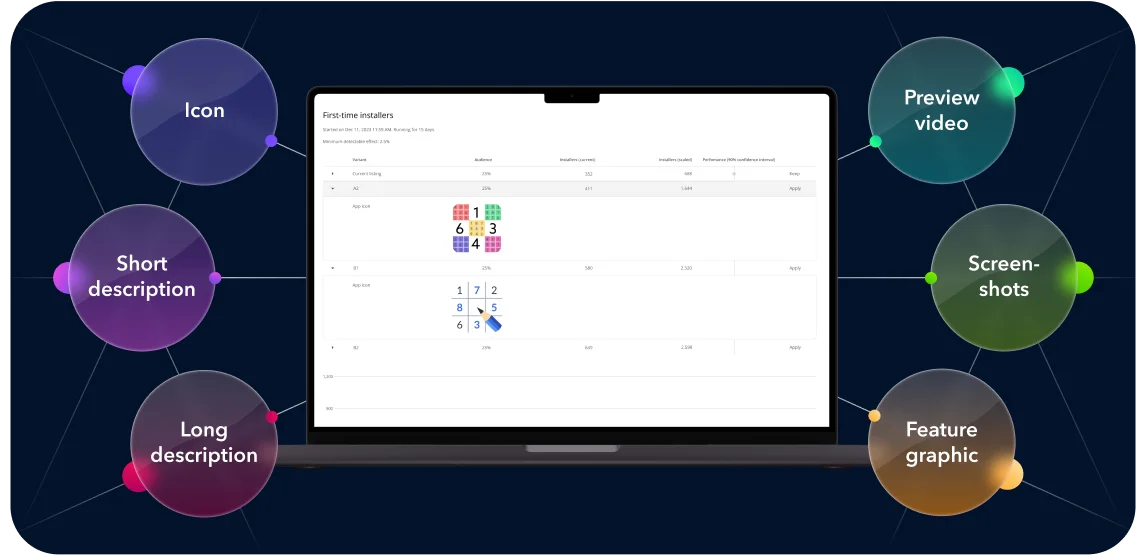
Just keep in mind that within one experiment, it’s better to test 1 hypothesis; otherwise, it’ll be hard to understand which change led to which results. If you’re testing localized creatives in different languages, you can run up to 5 experiments. You’ll find all the details about running tests in the help guide.
App Store A/B testing
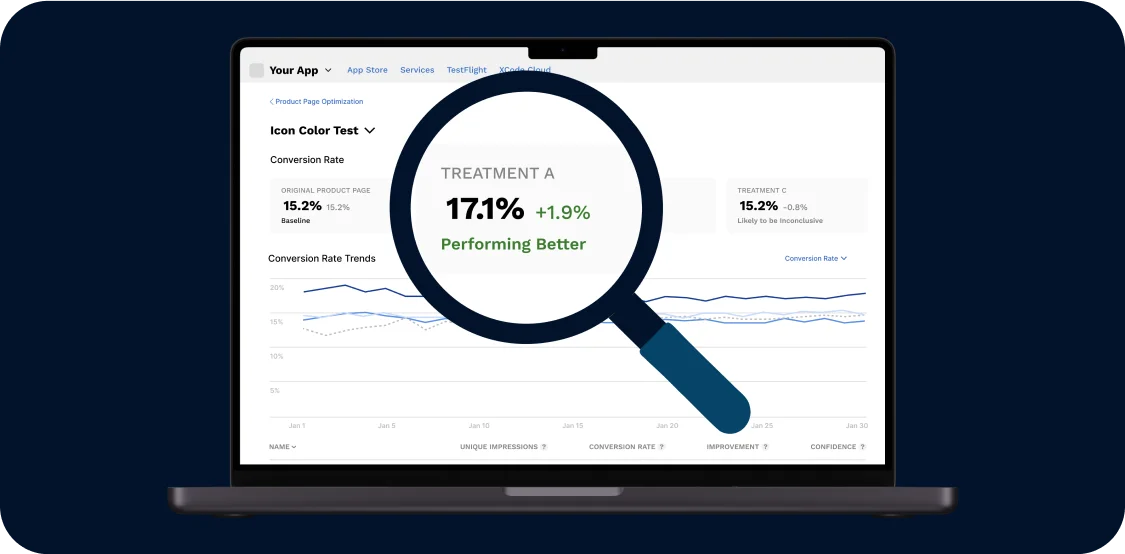
You’ll find detailed information about running tests in the help guide. Here, we’ll cover the most important points. To run A/B testing in the App Store, you’ll need to go to the Product Page Optimization section in the App Store Console.
Next Steps:
- Specify the test you’re running (A/B, A/B/B, A/B/C), countries (by default, 39 locales are selected), and duration.
- Upload the graphical materials you’ve prepared for testing and start.
Common Mistakes When Running an Experiment
- Too Short Testing Period. Typically, you need at least 7 days to evaluate test results. The duration depends on the app’s traffic and the “cleanliness” of the experiment. For example, it’s important that testing covers both weekdays and weekends, while holiday periods are best avoided.
- Experiment “Cleanliness”. It’s crucial that during the testing period, there are no external factors affecting the results of any experiment. For instance, if a paid campaign coincides with one experiment but not another, the results can’t be relevant.
- Results in One Store Aren’t the Same as in Another. We can’t compare the results of A/B testing between App Store and Google Play, as user behavior differs in each. So, each store needs its own testing.
- Testing Results Aren’t Static. This means that to be successful, testing should be ongoing. Today, users might prefer one icon background, and in a few weeks, they might favor another. So, keep studying your users’ behavior and preferences continuously, and don’t take the results of one test as something fixed.
- Margin of Error. Sometimes you might notice a 5-10% difference between creatives in the results. But this might just be a margin of error, meaning it doesn’t necessarily indicate that one option is better than the other.
Best Practices for A/B Testing in ASO
- Test One Element at a Time: To accurately identify the cause of any changes in performance, test one element at a time.
- Run Tests for Sufficient Duration: Allow tests to run long enough to gather statistically significant data.
- Segment Your Audience: Consider running tests for specific user segments to understand preferences across different demographics.
- Iterate Continuously: ASO is an ongoing process. Regularly conduct A/B tests to keep your app listing optimized for changing user preferences and market trends.
So, A/B testing is a powerful tool in the ASO toolkit, enabling developers to optimize their app listings based on real user data. By systematically testing and refining app store elements, developers can enhance visibility, increase downloads, and ultimately achieve greater success in the competitive app marketplace. Whether on the App Store or Google Play, implementing a strategic A/B testing approach is key to staying ahead and meeting user expectations.